


Toyota ERC & Eclipse ESN Radio Code Unlock Service (2026)
Eclipse ESN Radio Units (Japanese Models)
- Eclipse car radios, especially models imported from Japan, use a security system called ESN (Eclipse Security Network). This system is designed to prevent radio theft and locks the unit in case of unauthorized removal or power interruption.
- To make the unit operational again, a 6-digit ESN unlock code, generated from the 6-digit ESN serial number, must be entered.
Methods to Find the 6-Digit Eclipse ESN Serial Number
- Primary Method: Press and hold the Main and Navi/AV buttons on the radio unit simultaneously for a few seconds, or press these buttons multiple times. A new screen will appear, displaying the 6-digit ESN serial number (e.g., 3BFB42).
- Alternative Method 1: On some devices, it may be necessary to press the Main and Info buttons together.
- Alternative Method 2: Press and hold the main button on the navigation panel for a few seconds, and typically press the navigation key itself 5 times.
- The received ESN serial number should be a six-character alphanumeric code (e.g., “3BFB42″, “40793F“).
Examples of 6-Digit Eclipse ESN Serial Numbers;

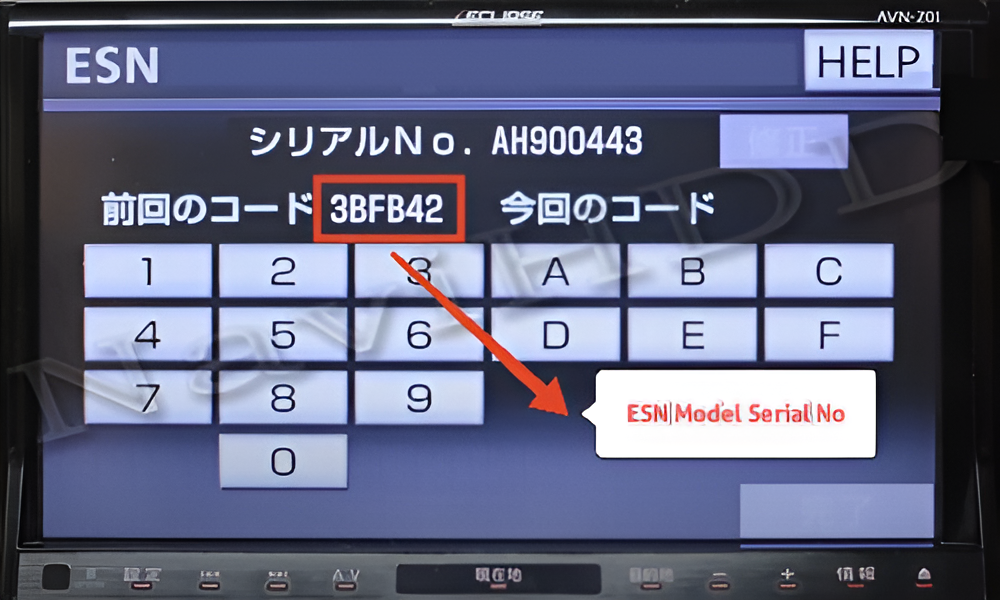


Toyota ERC Radio Units (Japanese Models)
- The ERC system activates when the car battery is disconnected or the radio unit is removed from the vehicle. In this case, basic multimedia functions such as the radio, CD/DVD player, Bluetooth, and navigation are locked.
- To make the unit operational again, an 8-digit ERC unlock code, generated from the 16-digit ERC serial number, must be entered.
Methods to Find the 16-Digit Toyota ERC Serial Number
- Press and hold the main button on your navigation player (usually labeled “MENU”, “NAVI”, “DISP”, “INFO”, or it might be a Japanese character button).
- While holding the main button, turn your parking lights on and off 3 to 4 times until a new screen appears.
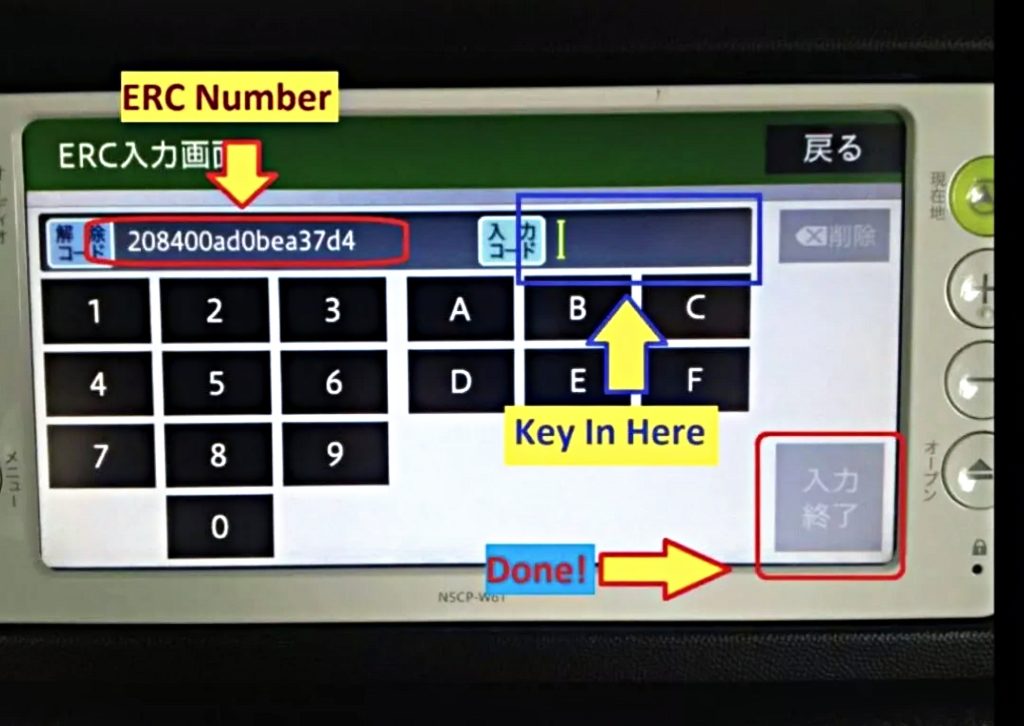
- Press the only active button that appears on this new screen. This action will take you to the screen where the 16-digit ERC serial number is displayed.
- The received ERC serial number is a 16-character alphanumeric string (e.g., “00C2908C00000000”, “B8763918AA7575A7”). These examples indicate that users have obtained the correct code.
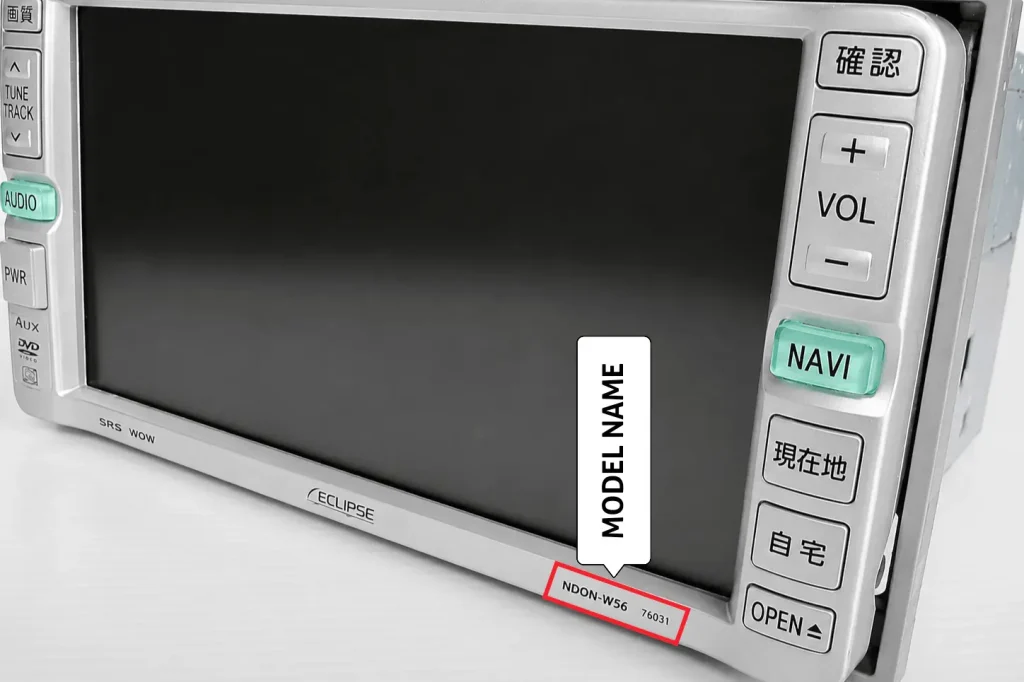
Where Is the Toyota ERC Model Name Located?

Examples of 16-Digit Toyota ERC Serial Numbers;

How to Use the Radio Code Finder Tool
- Enter your 6-digit Eclipse ESN or 16-digit Toyota ERC serial number into the query form field.
- Click the Search button.
- After the search process, the results will appear on the screen after a short while.
How to Enter the Toyota ERC / Eclipse ESN Unlock Code into the Device
- After receiving your unlock code, enter it using the A to F and 1 to 9 keys on your device’s touchscreen. After entering the code, confirm the operation to unlock your device.
For all CODE please contact us below
𝗙𝗼𝗿 𝗣𝗿𝗶𝗰𝗲 𝗮𝗻𝗱 𝗗𝗲𝗹𝗶𝘃𝗲𝗿𝘆 𝗽𝗿𝗼𝗰𝗲𝘀𝘀 𝗽𝗹𝗲𝗮𝘀𝗲 𝗰𝗼𝗻𝘁𝗮𝗰𝘁 𝘂𝘀
𝗪𝗵𝗮𝘁𝘀𝗮𝗽𝗽 /𝗩𝗶𝗯𝗲𝗿 (24 hours international hotline )
+61430386787
+8801672761737
Whatsapp click here (24 hours ready)
𝙏𝙚𝙡𝙚𝙜𝙧𝙖𝙢 𝙙𝙞𝙧𝙚𝙘𝙩 𝙘𝙝𝙖𝙩
Facebook Live 𝙙𝙞𝙧𝙚𝙘𝙩 𝙘𝙝𝙖𝙩