




LEXUS RX350 2018 Map Navigation sd card
$350.00
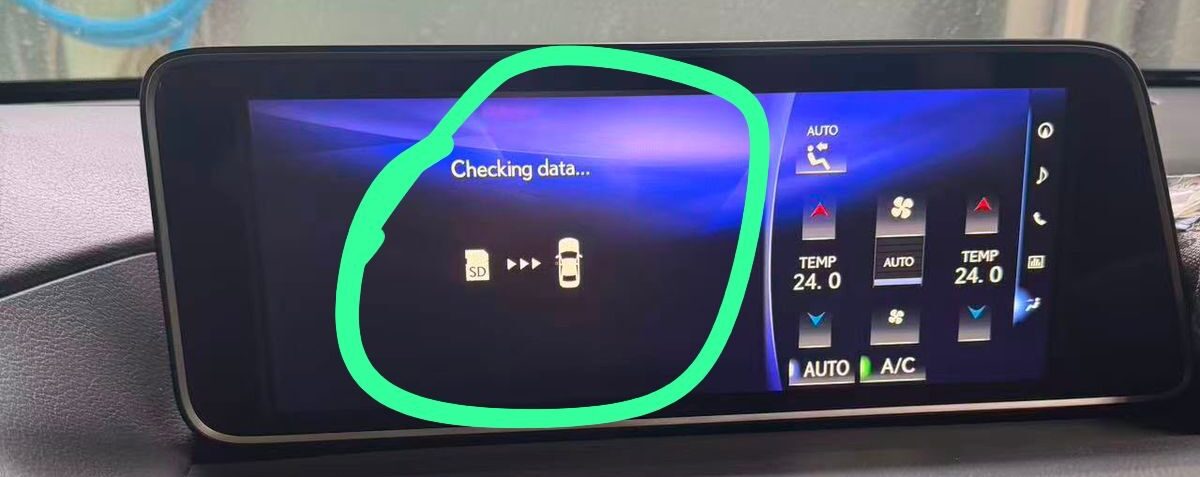
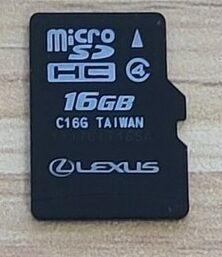
LEXUS RX350 Japanese variant vehicles often arrive in other countries missing their original map SD cards, or the cards get lost/corrupted over time. Without the authentic map/software data package matching your exact head unit part number, the system will remain locked on the error screen. We are selling the official ad card now
Description
For a 2018 Lexus RX350 (or similar Japanese Domestic Market Toyota/Lexus models) showing a map SD card error or a prompt demanding a map/system SD card, the head unit is locked because it cannot find or read the proper software and navigation data files.
JDM factory infotainment units rely heavily on the micro SD card not just for GPS maps, but also to boot up core software elements and unlock main menus (like audio, climate control, and settings).
Solutions to Fix the Map SD Card Error
1. Clean or Re-seat the Existing SD Card
-
Why: Dust, vibrations, or a loose connection can cause the system to fail to read the card.
-
How: Eject the micro SD card (usually located right on the face of the head unit or behind the motorized screen), gently clean the gold contacts using a soft cloth or a pencil eraser, and firmly reinsert it until it clicks. Restart the car.
2. Check for Corruption / Re-format (If original card is present)
-
Why: If the card’s filesystem has corrupted, the unit will throw a read error.
-
How: Insert the SD card into a computer via a card reader. Check if Windows/macOS can read the files. If it’s corrupted and you have a backup, you can reformat it to FAT32 and restore the files. Note: Simply downloading random map files from the internet will not work, as Toyota/Lexus SD cards are cryptographically tied to unique hardware IDs/serial numbers.
3. Obtain a Replacement Original Map SD Card Data File
-
Why: Japanese import vehicles often arrive in other countries missing their original map SD cards, or the cards get lost/corrupted over time. Without the authentic map/software data package matching your exact head unit part number, the system will remain locked on the error screen.
-
How: You will need the exact factory-matched map data/software solution configured for your specific Lexus/Toyota navigation model version.
Need Assistance?
If your unit is missing the card entirely or the software data is corrupted, specialized support is available to get your infotainment screen booting properly:
For Price, Payment method, Delivery method – please message us on WhatsApp or Viber (24 hours).
𝗪𝗵𝗮𝘁𝘀𝗮𝗽𝗽 /𝗩𝗶𝗯𝗲𝗿 (24 hours)
📲 +61430386787
📲 +𝟴𝟴𝟬𝟭𝟲𝟳𝟮𝟳𝟲𝟭𝟳𝟯𝟳
WhatsApp chat
Wa.me/61430386787
Payments are
VISA / MASTERCARD
PAYPAL
BANK TRANSFER
WISE
REMITLY
PAYID
🎯 Any inquiry pls inbox facebook https://m.me/navigationdisk
📲 Whatsapp https://wa.me/8801672761737
📮 Email sales@navigationdiskjp.com
Web: https://www.navigationdiskjp.com
#NavigationDisk
Top line Youtube link
https://www.youtube.com/watch?v=Fzkf-nYsF3o [ How to unlock Toyota ]
https://youtube.com/shorts/iIlm1pqQtyU [ How to unlock honda gathers ]
https://youtube.com/shorts/8-ytzVML0T0 [ Kenwood radio code unlock ]
#Automobile #Toyota #Honda #Nissan #Jdm #JapanCars #Navigationdisk #Toyota #Honda #Nissan #Mazda #Subaru #Vw #Audi #clarion #esn #erc #hondagathers #gathersunlock #eclipse #Mapdisc #Mapdisk #navigationdisk
Additional information
| Weight | 0.5 kg |
|---|---|
| Dimensions | 20 × 20 × 20 cm |

Reviews
There are no reviews yet.